BLStudioGo 2.00.00 (UV)

A Windows 11 compatible Software Package for PerkinElmer UV/Vis spectrometers of the LS365+ series

BLStudio is an intuitive and flexible software package to control PerkinElmer UV/Vis spectrometers of the LS365+ series Spectrophotometers. If you are looking for a lightweight, yet flexible alternative to UV Winlab, try our free test version. BLStudio can import already existing spectra.

Ease of Use

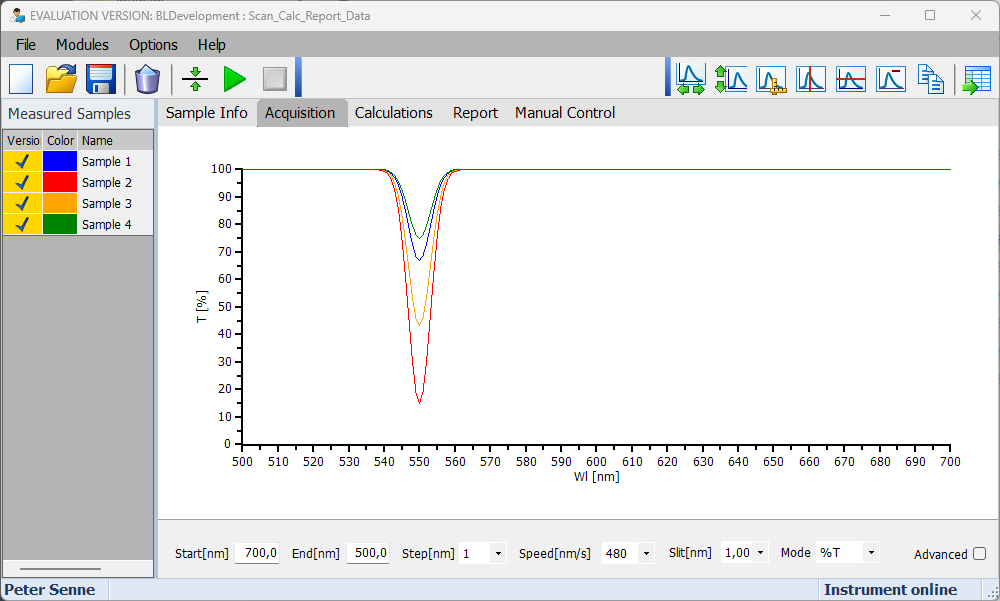
Image showing the ease of use of the BioLight Studio SoftwareThe BioLight Studio Software package was designed for intuitive operation from the very start:

BLStudioGo UV has been designed from the ground up for simple and straightforward installation. The setup package is less than 15 MB, making installation fast and placing only minimal demands on the available hardware.

The software is completely based on .NET and does not require Windows registry entries. It can therefore be installed by a standard user and transferred between PCs with ease. This keeps the installation process simple and minimizes the need for IT
support.

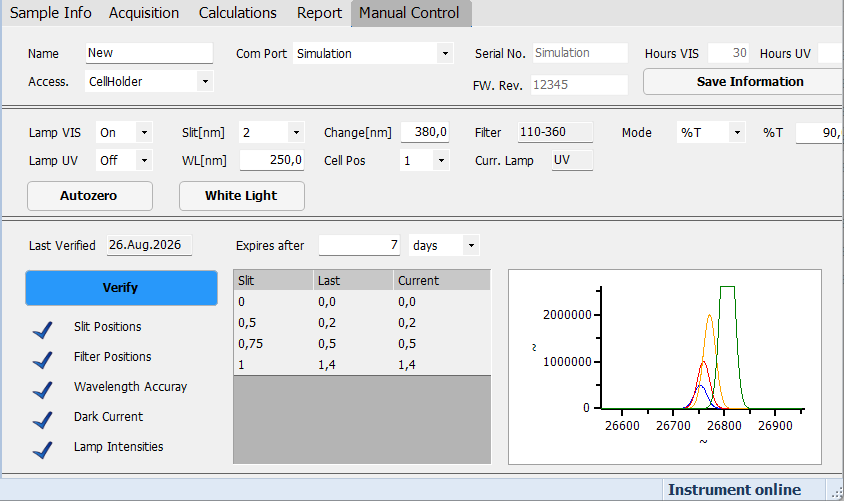
When BLStudioGo UV is started for the first time, the manual control page is displayed. After selecting the appropriate COM port, the software connects to the spectrometer.

Instrument information such as the serial number, firmware version, and lamp operating hours is automatically retrieved
and displayed. The spectrometer can then be assigned an individual name.

All current instrument settings are also clearly displayed during operation. Parameters such as wavelength, slit, and ordinate can be adjusted manually.

For frequently used functions, convenient one-click actions are available, for example for white light or AZ. Manual instrument settings remain independent of the method and are not stored as part of the measurement method.
From Method to Measurement Result

A first measurement can be performed quickly with BLStudioGo UV.

Using Open Method, the required method can be selected, for example a simple Scan method. The desired measurement parameters can then be configured on the Acquisition page.

Pressing Run Method starts the data acquisition. A blank sample can first be inserted to perform a baseline correction. The sample is then inserted, sample information such as the sample name can be updated, and the acquisition can be started.

The measured data is displayed graphically. The graph can be individually formatted using the Graph Toolbar.

During acquisition, the Samples panel is automatically updated. Individual measurements can be shown or hidden, and samples can be remeasured when required.

Measurements can also be displayed in chronological order, including baseline corrections and remeasured samples. This provides a clear overview of the complete acquisition sequence.

Instrument Verification – When It Matters

BLStudioGo UV takes a practical approach to instrument verification:

Unlike UVWinLab, an Instrument Performance Verification (IPV) is not required every time the instrument is started. This makes startup faster and less prone to errors.

Verification can instead be performed whenever appropriate – for example, after the instrument has warmed up.

The verification process is visualized to make the results easier to interpret. Verification results are stored under the serial number of the instrument, allowing them to be reviewed later.

Image showing the instrument parameter settings of the BioLight Studio Software

Powerful UV/Vis Software for Routine and Research

Easy to use. Flexible in application. Ready for individual requirements.

BLStudioGo UV is a modern, lightweight, Windows 11 compatible software solution for controlling and evaluating UV/Vis spectrometers of the LS365+ series. It was developed as a lightweight and flexible alternative to UVWinLab, combining an intuitive user interface with comprehensive capabilities for measurement, calculation, and reporting.

BLStudioGo UV is designed for both routine applications and research. Methods can be created conveniently, measurements performed, data evaluated, and results documented -- without unnecessarily complicating the user interface.

For routine operation, BLStudioGo UV provides a simplified user interface that is particularly well suited for touchscreen operation. At the same time, the development environment provides extensive functionality for creating individual methods and calculations.

Sample Information and Data Management

In addition to measurement data, BLStudioGo UV provides flexible management of sample information.

The Sample Info page allows information to be predefined or updated after measurement. Columns can be added and formatted using the Sample Info Toolbar.

Sample information can also be stored to and loaded from files.

Methods and measurement data can be managed flexibly as well. Modified methods can be saved, with the option of keeping measurement data within the method.

Measurement data can be stored in Tasks, which can be saved and reloaded at a later time.

Export and Extend Your Measurements

BLStudioGo UV provides several ways to reuse and process measurement data.

Raw data can be exported, for example, for use in Word or Excel. Tabular data can also be selected and exported.

Existing Tasks can be extended with additional measurements. Simply load the Task and run the method again.

If acquisition parameters are changed -- for example scan start/end values, ordinate, or slit -- starting the measurement automatically creates a new Task.

Changes to parameters that are independent of data acquisition, such as graph formatting or calculation parameters, do not invalidate the existing measurement data.

This makes it possible, for example, to add a new calculation module and recalculate existing data without having to repeat the measurement.

Flexible Calculations for Individual Requirements

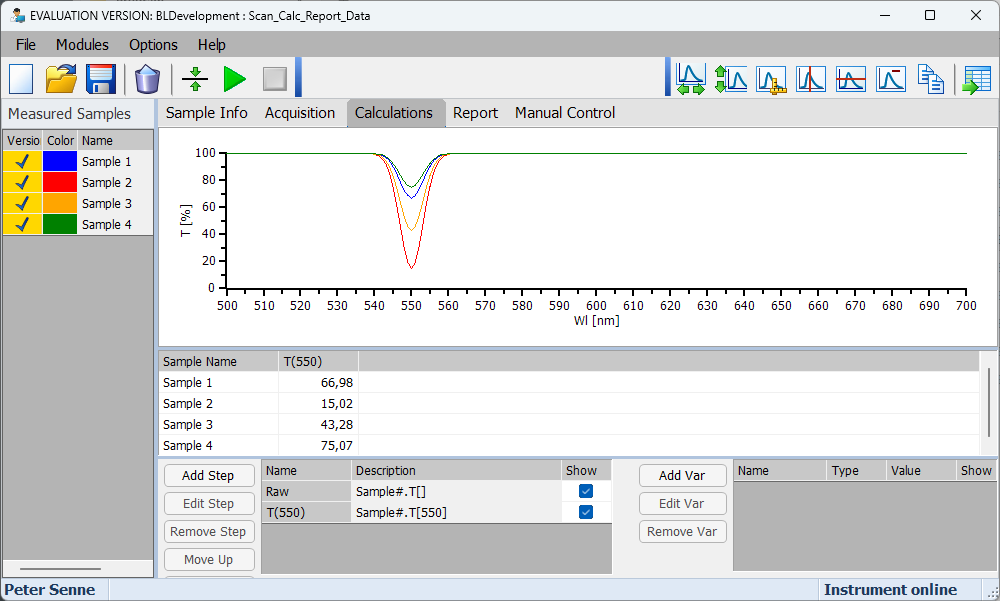
Image showing the calculation module of the BioLight Studio SoftwareBLStudioGo UV goes beyond data acquisition.
Using Modules / New Calculation Module, calculation modules can be added to an existing method or Task without invalidating previously measured data.

A calculation method consists of a series of calculation steps. The required calculation type can be selected and configured using the corresponding wizard.

Arithmetic calculations are also supported. Formulas can either be assembled using the available functions or entered manually. The result is automatically added as a new column and calculated.

This makes it possible to adapt BLStudioGo UV to different evaluation requirements without having to repeat the original measurement.

Professional Reports Directly from Your Data

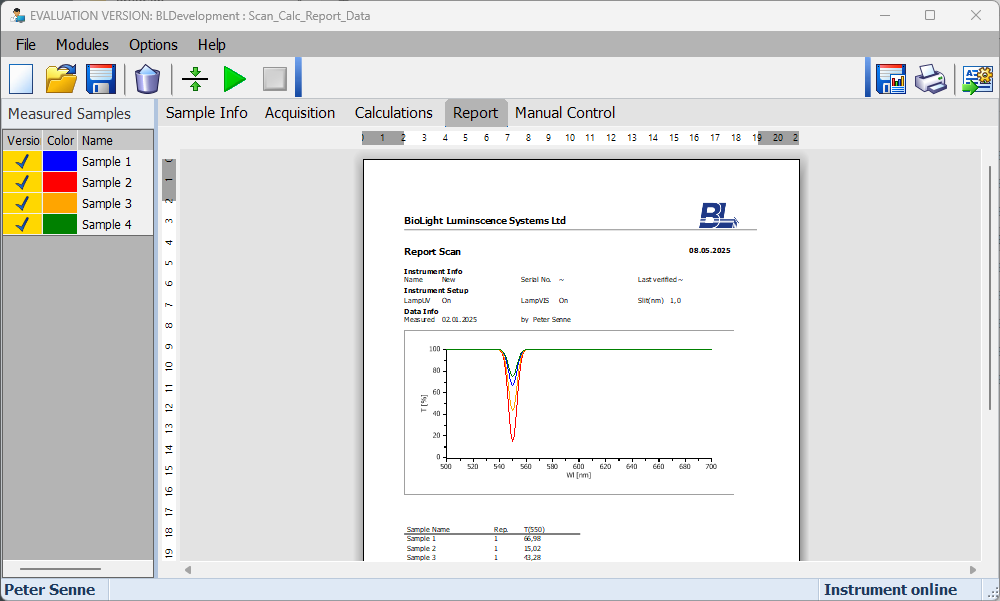
Image showing the report module of the BioLight Studio SoftwareBLStudioGo UV also provides integrated reporting capabilities.
Using Modules / New Report Module, a report can be added to an existing method or Task without invalidating existing measurement data or calculations.

After adding a report module, BLStudioGo UV automatically creates a standard report.

For individual requirements, report templates can be customized. Page size and layout can be defined using the report functions, and templates can be saved and loaded for reuse.

A range of report objects can be added, including graphs, table, text fields, pictures and lines.

Individual objects can then be edited as required. Returning to the Report view automatically applies the changes and generates the updated report.

Import Existing Spectra

Existing spectra can be imported as measurements directly into BLStudioGo UV.

This can be useful for verifying calculations or for displaying expected results before performing new measurements.

The imported spectra can therefore be integrated into the measurement workflow and used alongside newly acquired data.

One System for Development and Routine Operation

One of the key strengths of BLStudioGo UV is the combination of method development and routine operation.

For routine applications, BLStudioGo UV provides a deliberately simplified user interface. It is particularly suitable for use with the L365+ touchscreen.

The routine interface is not a separate software product. It uses exactly the same code as BLStudioGo Development -- there is only one executable file.

Users can switch between the different views. Methods can first be developed in the development environment and later used for routine measurements.

This allows method development and daily routine operation to be managed within one consistent software environment.

BLStudioGo UV Routine

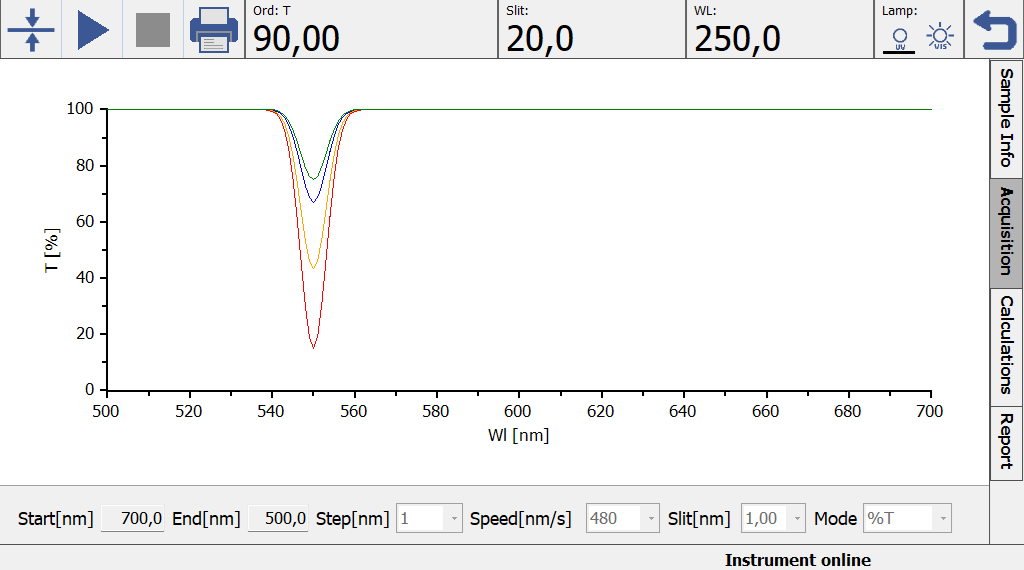
Image showing the routine interface of the BioLight Studio SoftwareThe Routine view focuses on the essential tasks of daily measurement operation.

The simplified interface can be started from the Routine desktop. Instrument information such as the COM port and external accessories can be configured.

Manual instrument control is also available, allowing instrument parameters to be set directly.

Instrument verification can be started with one button click. Individual positions can then be selected to view detailed information.

For measurement, predefined methods can be run and acquisition parameters can be adjusted as required.

BLStudioGo UV also provides customizable color schemes, allowing the interface to be adapted to different user preferences.